
Run SQL against a remote server
TodayTerminal, an ssh session and the mysql client
In CalíopeSQL Editor over a native SwiftNIO SSH tunnel, with schema-aware autocomplete and a linter
Calíope is a SwiftUI-native client for MySQL, MariaDB, Amazon Aurora, TiDB, PostgreSQL, SQL Server, Oracle Database, ClickHouse, MongoDB, Redis, Valkey, Apache Cassandra, ScyllaDB, Elasticsearch and OpenSearch, and for SQLite and DuckDB files, on every Apple screen you own — with widgets on the macOS desktop showing your server's real metrics, plus Home and Lock Screen widgets on iPhone and iPad and widgets on the wall in Apple Vision Pro, a schema-aware AI assistant and iCloud-synced connection profiles. One payment, every device, forever: $99.99 once, with 30 days free.

What this site describes. This page shows Calíope 1.7 · in progress, the version I am building right now — and 1.6 · October 22, 2026 is on the App Store for the Mac, iPad, iPhone, Apple Watch, Apple TV and Apple Vision Pro.
Calíope requires macOS 26 Tahoe, iPadOS 26, iOS 26, visionOS 26, watchOS 26 and tvOS 26: dictation is recognised on the device and the assistant runs on Apple Intelligence with no key, and both arrived with the 26 systems.
Calíope is one app, not a family of them: the same App Store page installs it on your Mac, your iPad, your iPhone, your Apple Watch, your Apple TV and your Apple Vision Pro. The iPhone, Apple Watch and Apple TV screens arrived with 1.4 and can be downloaded now.
One purchase covers Calíope on the Mac, the iPad, the iPhone, the Apple Watch, the Apple TV and Apple Vision Pro — every device signed into your Apple ID — with every future update included. No subscription, no renewals.
The fair comparison is not with the free clients. Navicat for MySQL costs $1,299 for a perpetual licence; DBeaver Lite costs $113 a year. Sequel Ace is excellent and free, and if it covers your day, it is the right choice. Thirty days without a card is long enough to find out which one you are.
Eight windows for a single shift on call. The real cost isn't the licences, it's the context you drop every time you move. Calíope's tools exist so a whole working day fits in one window — not to make a feature list look long.
TodayTerminal, an ssh session and the mysql client
In CalíopeSQL Editor over a native SwiftNIO SSH tunnel, with schema-aware autocomplete and a linter
TodayphpMyAdmin, or a desktop client you keep around just for its object browser
In CalíopeCatalogs, Table Builder and an interactive ER Diagram with editable foreign keys
TodayYour host's console, a Grafana tab, and SHOW PROCESSLIST on repeat
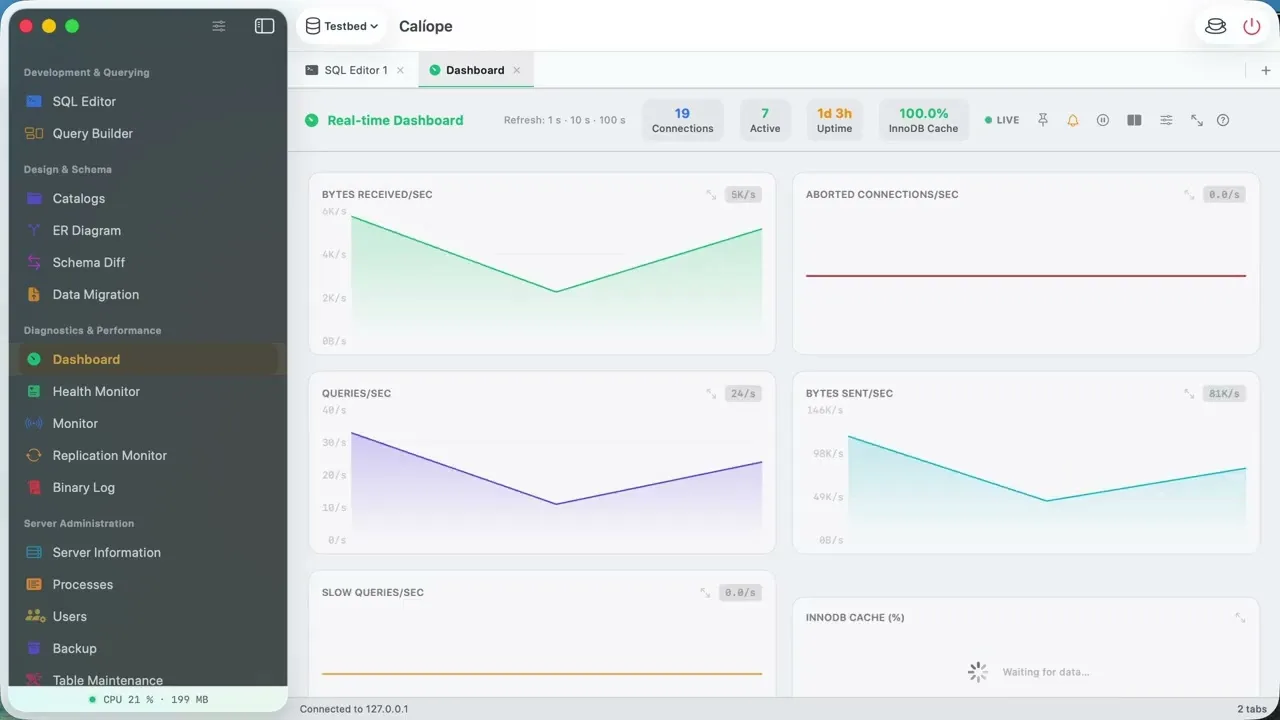
In CalíopeDashboard, Server information, Process list, SQL alerts and the Server health monitor
TodayA mysqldump script plus a cron entry you hope is still running
In CalíopeBackup with granular selection, a scheduler from every few hours to monthly, retention rules and gzip
.sqlite or .duckdb fileTodayDB Browser for SQLite and the duckdb command line — two more applications, each with its own window and habits
In CalíopeSQLite Editor and DuckDB Editor: structure, data and Execute SQL — and a Parquet, CSV or JSON queried where it already is. No server, no connection.
.sql, .csv or .log someone sent youTodayA text editor, or a spreadsheet that reformats your CSV on the way in
In CalíopeFile Previewer: highlighted SQL, CSV as a table, rendered Markdown and RTF. Read-only, offline.
TodayA chatbot in the browser, where you paste the schema by hand every single time
In CalíopeAI Assistant that already holds the active schema as context. Your question and the schema — never rows.
TodayVNC into the Mac, or a mobile client that stops at listing tables
In CalíopeThe same app, native on iPad and on your iPhone, plus Home Screen and Lock Screen widgets — carrying your connections, snippets, history and error log over iCloud
And none of it is permanently on screen. Every tool is a tab you open when the task asks for it, pin if you use it daily, and close when you're done — the workspace only ever shows what you opened. The list is long because a DBA's day is long. See the full inventory →
I'm not trying to support every database engine on Earth. I focus on MySQL, MariaDB, Amazon Aurora, TiDB, PostgreSQL, SQL Server, Oracle Database, ClickHouse, MongoDB, Redis, Valkey, Apache Cassandra, ScyllaDB, Elasticsearch and OpenSearch, with SQLite and DuckDB files, and I build the parts the Apple ecosystem expects. And Calíope is the only database client in the App Store on six Apple screens — Mac, iPad, iPhone, Apple Watch, Apple TV and Apple Vision Pro — with a single purchase.
Widgets on the macOS desktop with your server's real metrics — and the same widgets on iPhone, iPad and Apple Vision Pro: 4 sizes on the macOS desktop (3 in Notification Center), 4 sizes on the iPad Home Screen (incl. Extra Large) and 3 on the iPhone's, and 3 Lock Screen accessories (Rectangular, Circular, Inline). And in Apple Vision Pro, 4 sizes on a wall, on glass you see the wall through. Live connections, QPS, cache hit rate and uptime — no app launch required.
Server metrics on the desktop and on the wallAsk in plain English. The assistant sends the active database's tables, columns and foreign keys as context to the provider you chose — with Apple Intelligence nothing leaves the device, and with Ollama nothing goes beyond the machine you point it at — so the SQL it returns is runnable against your data — not a hypothetical schema.
Your key. The schema, never rows.Sequel Ace has no iPad. TablePlus treats it as a second-class device, and reaches Apple Vision Pro as its iPad app in a window. Calíope's iPad app is 100% SwiftUI — DDL Hint Bar, drag gestures, Extra Large widgets and AppIntents for Siri — and on Apple Vision Pro it is built for visionOS: the system glass, toolbars as ornaments and windows you place around the room.
Built for each device, not adaptedVerified 31 October 2026. MariaDB, MySQL, PostgreSQL and SQL Server clients, plus the reference tools for MongoDB and local SQLite — two areas Calíope also covers.
| Product | Price | Platforms | iPad native | Widgets | AI |
|---|---|---|---|---|---|
| Calíope | $99.99 once · 30-day trial · lifetime updates | Mac, iPad, iPhone, Apple Vision Pro · Apple Watch and Apple TV (read-only screens) | Yes | Mac desktop · iPhone and iPad Home Screen · Lock Screen · Apple Vision Pro wall | Yes — Apple Intelligence with no key, Ollama on your machine, BYOK (OpenAI, Gemini, Claude), MCP server |
| TablePlus | $99 perpetual + $59/device/yr updates | macOS, Windows, Linux, iOS | Minimal iOS app | iOS only (since Jun 2026) | Yes — BYOK (OpenAI, Anthropic, Copilot, local) |
| TablePro | Free · Starter $2.99/mo, $24/yr or $59 lifetime · Team $25/seat once | macOS (DMG, outside the Mac App Store) + iPhone/iPad (App Store since 22 Sep 2026) | Yes — App Store, a reduced app with 12 engines, MongoDB included: no AI, no MCP | iOS only (Quick Connect) | Yes — 14 providers, local Ollama/llama.cpp/MLX, MCP server |
| Forge Database Manager | $19.99 once | Mac, iPad and iPhone (App Store, one purchase) | Yes — universal app | Not documented | Local MCP server, read-only by default; no chat documented |
| QueryDeck | $79 launch price for the first ten customers, then $149 lifetime · 14-day trial | macOS only (DMG, outside the Mac App Store) | No | Not documented | Yes — BYOK, local Ollama or on-device, MCP server |
| Sequel Ace | Free (MIT) | macOS only | No | No | No |
| Native SQL Server Manager | $19.99 | macOS only (Mac App Store), SQL Server only | No | Not documented | No |
| MySQL Workbench | Free (Oracle) | macOS (Apple Silicon), Windows, Linux | No | No | No |
| HeidiSQL | Free (GPL) | macOS (Apple Silicon only), Windows, Linux | No | No | No |
| VS Code + PostgreSQL extension | Free (Microsoft) | macOS, Windows, Linux | No | No | Yes — GitHub Copilot |
| Navicat for MySQL | $1,299 perpetual (Enterprise) | macOS, Windows, Linux, iOS | Separate basic app | No | Add-on |
| DBeaver Lite | $113 / year | macOS, Windows, Linux (Java) | No | No | Yes — AI assistant |
| DB Pilot | $79 one-time | macOS only | No | No | Yes — BYOK (OpenAI, Anthropic, Google, xAI) |
| Pluk | Free + $15/mo Pro | macOS only (AppKit + SwiftUI, AGPL) | No | No | Yes — notebook agent |
| DB Connect | Free (1 connection) · $9.99 once | Mac, iPad, iPhone (one universal purchase) | Yes | Mac desktop (saved-query monitors) | No |
| Postico 2 | $69 personal (3 devices) / $99 commercial, perpetual | macOS only | No | No | No |
| Beekeeper Studio | $9–18 / mo by plan (Electron) | macOS, Windows, Linux | No | No | Yes — AI Shell BYOK |
| DB Compass | Free + $9.99 Pro | iOS app: iPhone, iPad, Mac M1+, Vision | Yes | Home + Lock Screen (iOS) | Yes — Gemini, Claude, Apple Intelligence |
| SQLPro Studio | Subscription / lifetime | macOS, iPadOS, Windows | Touch-adapted | No | No |
| MongoDB Compass | Free (MongoDB) | macOS, Windows, Linux (Electron) | No | No | Yes — natural-language querying |
| DB Browser for SQLite | Free (GPL) | macOS, Windows, Linux (Qt) | No | No | No |
Calíope ships with the same depth you'd expect from a premium desktop client — plus the parts only Apple platforms make possible.
StrictHostKeyCheckingALTER scriptcaliope://server/<uuid>): tap widget → dashboard.sql files from FinderEvery tool is a native SwiftUI tab that works on Mac, iPad, iPhone and Apple Vision Pro: twenty-seven in the tool navigator, Table Builder and Visual EXPLAIN in context, six more of their own when the session is MongoDB, seven when it is Redis, seven when it is Cassandra or ScyllaDB, and seven when it is Elasticsearch or OpenSearch. What each one does is on its own card, on the tools page.
These are the same screenshots reviewed and approved by Apple. Every window is native SwiftUI — no web views, no cross-platform emulation. How it's built →


Calíope's widget shows live metrics from your pinned profile — 4 sizes on the macOS desktop (3 in Notification Center, which does not take Extra Large), 4 sizes on the iPad Home Screen, 3 on the iPhone's and 3 Lock Screen accessories, and 4 sizes on a wall in Apple Vision Pro. Tap the widget to jump straight to the dashboard of the right server.


The same Calíope you install on the Mac and the iPad installs on your iPhone, from the same App Store page, and there it lays itself out for the phone. It connects to your servers and runs your queries — and your profiles, snippets, history and assistant conversations are already there, carried over by your own iCloud.
Your profiles with their groups: create, edit, duplicate and delete them from the phone. Passwords stay in your Keychain.
Write a query and run it against your server, with the results, the chart and the map right there.
Browse databases, tables, indexes and views, and read the DDL of any object.
The live metrics of the server you are connected to, and the replication topology you declared.
Your library, what you actually ran, and past conversations — carried over by your own iCloud.
Everything runs on the phone: it connects to your servers and executes your queries. It is not a read-only mirror of the Mac.


The iPhone layout is available now, with Calíope 1.4. It arrives with Calíope itself: nothing extra to install and nothing extra to buy, because it is covered by the same purchase as the Mac and the iPad.
From 1.6, Calíope is a native visionOS app on Apple Vision Pro — not the iPad app in a window. It comes from the same App Store page and the same purchase, it connects to your servers and runs your queries, and every tool is there, with nothing removed.


The SQL editor, the schema browser, the ER diagram, backups, reports and the query builder: the same tools as on the iPad.
Open several windows and leave each one where you want it. The tool navigator and your open tabs live in ornaments outside the glass.
Every control is sized for your eyes and lights up when you look at it. Optic ID where the iPad says Face ID.
The metrics of your pinned server and the health of the fleet, on glass you see the wall through.
The native Apple Vision Pro app is available now, with Calíope 1.6. Nothing extra to install and nothing extra to buy: what it is like on Apple Vision Pro.
The Apple Watch shows the messages Calíope publishes to your own private iCloud, and the Apple TV turns what it measures into a wall dashboard for your fleet. Neither connects to a database, and neither costs anything extra: what each one does, in detail.
With Apple Intelligence, nothing leaves the device; with Ollama, nothing goes beyond the machine you point it at. With OpenAI, Gemini or Claude, the schema of the active database — table names, columns and foreign keys — does travel to that provider, under your own key. Rows and credentials never do. With no provider configured, everything else in Calíope works.
SELECT u.id,
       u.email,
       COUNT(o.id) AS total_orders,
       SUM(o.amount) AS total_amount
FROM   users u
JOIN   orders o ON o.user_id = u.id
WHERE  o.created_at >= DATE_SUB(NOW(), INTERVAL 30 DAY)
GROUP BY u.id, u.email
ORDER BY total_orders DESC
LIMIT 5;
In July 2026 I went through the whole codebase looking for security flaws — my own review, not a third-party audit, and I do not present it as one. What you can check yourself: Calíope has no server and no accounts, so there is nowhere for your credentials to go — they live in your device's Keychain, and iCloud Keychain is an explicit opt-in (how that works); the host key is verified the way OpenSSH does it; TLS is validated by default; and identifiers are escaped centrally.
Native SSH tunnel with ed25519 and ECDSA P-256/384/521. No dependency on system ssh. Decrypted keys never written to disk.
The host fingerprint is stored in Keychain on first connection. If it changes, Calíope refuses to connect — same behavior as OpenSSH's StrictHostKeyChecking=yes.
When you enable SSL, certificate chain is fully verified by default against system trust roots. Accepting unverified certs requires an explicit, warned-toggle.
Database passwords stay on the device by default. iCloud Keychain sync is a deliberate choice, not an automatic side effect of using iCloud.
The values Calíope’s tools send for you travel as parameters of each engine’s own prepared statement — ? placeholders on MariaDB and MySQL, $n parameters on PostgreSQL, sp_executesql parameters on SQL Server, :1 binds on Oracle Database, typed {name:Type} parameters on ClickHouse — never concatenated into the SQL. What you write in the SQL editor is sent as you wrote it, as in any client. Identifiers (database, table, column names) flow through a centralized escape helper, so a malicious object name in the schema can't break out into your queries either.
One button erases what Calíope stores in six places — this device, the Keychain, iCloud Drive, the iCloud key-value store, CloudKit and the widget’s data — on every device, and tells you what it deleted in each. GDPR Article 17.
Calíope grows from what you tell me. Your feature requests shape my roadmap, and the usage report you choose to email me helps me eradicate bugs fast.
Every suggestion sent to me is logged on the public roadmap. Your feedback signals what database tools and workflows I should build next.
No background tracking or hidden analytics. The usage report is off out of the box: nothing is written to it until you switch it on in Settings. What it writes stays on your device as plain, human-readable JSON — nothing is ever sent automatically.
If you turn the report on and email me the file, those tool usage counters and error reports help me eliminate bugs swiftly and focus engineering effort on the tools you use most. They carry no name, no account and no advertising identifier. It is entirely your call — nothing reaches me on its own.
Yes and no, and it is spelled out in the notice at the top of the page: 1.6 is on the App Store for the Mac, iPad, iPhone, Apple Watch, Apple TV and Apple Vision Pro, and this page describes 1.7, the version I am building now. Everything on this page is real and finished — built, not planned. The changelog marks which release each feature landed in.
Yes. In the DuckDB Editor, Query data file… creates a view over each file you pick — Parquet, CSV or JSON — and the file stays where it is: nothing is copied into a database. If there is no database open, Calíope opens one in memory, and Save as… writes it to a .duckdb file when you want to keep it. DuckDB is compiled into the app: there is nothing to install and no server to run.
Every tool is a workspace tab, and the workspace only shows the tabs you opened — a new session
starts with one. Nothing polls, renders or holds memory until you open it, so you can pin the three
you use daily and never think about the rest. The list is long for the same reason you have eight
apps open right now: a DBA's day covers querying, schema work, monitoring, backups, users, local
files and the odd .csv someone emails you. That's the trade I made
— breadth so you stop switching, not breadth for its own sake.
And I did not build them to have a long list: I have worked as a DBA since 2016, each one came out of a shift when I needed it, and I use them every day against my own servers — which is why they are finished.
Twenty-seven top-level workspace tools — each opens as a dedicated tab you can pin, reorder or close: SQL Editor, Dashboard, AI Assistant, Catalogs, Query Builder, Server information, Process list, SQL alerts, Backup, User admin, Table maintenance, Data migration, ER Diagram, Schema diff, Replication monitor, Binlog viewer, Snippets, Query log, Server health monitor, SQLite Editor, DuckDB Editor, File Previewer, Error log, Global search and replace, Reports, Replication topology, Slow query log. Two more — Table Builder and Visual EXPLAIN — open contextually from Catalogs and the SQL Editor, for twenty-nine in total. A MongoDB session adds six of its own: Collections, Query, Indexes, Server, Commands and Profiler. A Redis session adds seven: Key browser, Server panel, Memory analyzer, Slow commands, Connected clients, Command console and Node topology. A Cassandra or ScyllaDB session adds seven: CQL Query, Keyspace explorer, Cluster, Node, Connected clients, Traces and slow queries, and Roles and permissions. An Elasticsearch or OpenSearch session adds seven: Query, Indices, Cluster health, Node, Running tasks, Snapshots, and Users and roles. See the full inventory.
Yes — PostgreSQL is supported natively, with its own provider rather than a MySQL adapter: connection profiles, schema browser, SQL editor with its own snippets and keywords, backups and restores, maintenance, roles and privileges, and server monitoring. It joins MariaDB, MySQL, Amazon Aurora and TiDB, and so does SQL Server, from version 2022, over a driver I wrote from the protocol Microsoft publishes, and so does ClickHouse, from version 25.3, over its HTTP or HTTPS interface, and so does Oracle Database, from version 26ai, over a driver I wrote from the code Oracle names as the reference for its protocol. Replication is a MySQL, MariaDB, ClickHouse, Redis and Valkey matter — on ClickHouse each replicated table shows its replicas, and Redis shows its nodes in Node topology — and Calíope hides what an engine cannot do instead of showing it greyed out. Beyond those eight, Calíope opens local SQLite and DuckDB files and carries a set of MongoDB tools, another for Redis and Valkey, another for Apache Cassandra and ScyllaDB, and another for Elasticsearch and OpenSearch. What it does not try to be is a Swiss Army knife across every engine on Earth — if that is what you need, TablePlus or DBeaver are excellent alternatives.
I am not an expert in every engine Calíope covers, and I do not claim to be. I use all of them in my work, some more than others, and I have been building database tools for years — first a component for Gambas, then the Qt Calíope, now this one: the whole path.
The current Calíope is Apple platforms only — its value is the deep integration with macOS, iPadOS, iOS, visionOS, widgets, AppIntents, Keychain and iCloud, which a cross-platform port would lose. If you need Windows or Linux, the older Qt-based Calíope is still available as an unmaintained archive on the Legacy Qt builds page.
Your local data (profiles, query log, snippets) stays on your device: when the trial ends Calíope shows the purchase screen and deletes nothing. If you also want to erase it, use Settings › General → Delete All My Data. It also erases what is in your iCloud, on every device.
The app keeps working: it depends on no server of mine. What “forever” means is written under the price.
Only if you turn on optional features. The query log is local by default. iCloud sync of the query log is opt-in with a clear warning that literal query text travels to your private iCloud. The AI assistant only sends what you type plus schema metadata — never row data or credentials.
No — and you may not need any key at all: Apple Intelligence runs on your Mac and Ollama on a machine of yours, neither of them asks for one. The cloud providers do. And the AI assistant is one of many features: with no provider configured, every other capability works as expected.
Because Calíope includes an AI assistant that can connect to OpenAI, Google Gemini and Anthropic. In mainland China, the App Store only lists an app with generative AI if it holds the permits of the Chinese regulator, and those services do not have them. I could remove the assistant for that one store, but that would mean maintaining a second version of the app, and I chose not to. Calíope is available in every other country and region of the App Store, Hong Kong, Macao and Taiwan included.
Yes — Calíope is built and security-reviewed for daily professional use. SSH tunnel, TLS verification, biometric auth, DDL audit log and the SQL linter exist precisely for that scenario. The purchase is per Apple ID; for team licensing, please contact me.
MariaDB 10.2.3 or newer, MySQL 5.7.5 or newer. Older versions
lack the CLIENT_DEPRECATE_EOF protocol flag that Calíope relies on. TiDB 8.5 or newer, over the same MySQL protocol.
PostgreSQL 13 or newer: below that, some maintenance commands do not exist, and Calíope says so instead of failing. SQL Server 2022 or newer, always over an encrypted connection. ClickHouse 25.3 or newer, over HTTP or HTTPS. Oracle Database 26ai or newer, the release Oracle ships as a free container; 19c and 23ai speak the same protocol, but I have not measured them.
Since 1.3, dictation is recognised on the device, and since 1.4 the assistant runs on Apple Intelligence with no key. Both arrived with the 26 systems; earlier ones do not have them. They are what lets the assistant work with no key and with nothing leaving your machine. Calíope requires macOS 26, iPadOS 26, iOS 26, visionOS 26, watchOS 26 and tvOS 26; from 1.6, on Apple Vision Pro it is a native app for visionOS 26.
One person. Calíope is written and maintained by David Villalobos Cambronero, a DBA since 2016, in Costa Rica. This is the second client I build: the first was the Qt Calíope, started years before this one, and before it came a database component for Gambas. The About page tells the whole path, and why the Apple version is closed source.
Yes. I write it with AI assistance, and I review and approve every change before it ships; the responsibility stays mine. The About page explains how, and why that is what lets me sell it as a single purchase. This is about how the app is made. The AI Assistant inside Calíope is a separate thing, and you only use it if you open it.
After the muse. Calíope is Calliope, the eldest of the nine Muses: the muse of epic poetry, and the one whose name means beautiful voice. She was who you asked for the long story — the one that had to be told in order, from the beginning, with nothing left out.
That is the job of a database client, and the reason the name stuck. Calíope does not invent your data and does not own it: it gives it a voice and an order you can follow, and then gets out of the way. The accent stays on the í because the name is Spanish, which is the language it was named in.